EmmaukachuFx TradeSignal Request access

Forex charts, signals and market news in one place

EmmaukachuFx TradeSignal is a forex toolkit for Deriv, MT5/MT4 and cTrader traders. It reads live prices, checks several timeframes at once and shows you where they line up, so you can make the decision yourself.

Request access on Telegram See how it works

The app is private for now. If enough people ask, we may open it to everyone, so tell us you are interested. Already have access? Open the app.

Illustration of a candlestick chart Rising and falling candles with a trend line and a note that three of four timeframes agree. This is an illustration, not live data. 3 of 4 timeframes agree
Illustration of the idea. Not live data, and not a past result.

About EmmaukachuFx TradeSignal

EmmaukachuFx TradeSignal is a forex toolkit that brings charts, signals, market news and trading tools into one web app. It was created by Ukachu Emmanuel Chinonso.

The app reads live prices, checks several timeframes at once and shows where they line up. It has eight tabs: TradingView charts and analysis, Rise/Fall trading on Deriv, an MT5/MT4 web terminal, cTrader, live Deriv prices, Deriv trade management, an AI assistant and a style studio. You make the decisions yourself.

Who it is for
Forex traders who use Deriv, MT4/MT5 or cTrader and want charts, trend checks, a currency strength meter, news and an AI assistant in one place.
What it is not
It is not a broker and never holds your money. It does not give financial advice, and no signal or AI answer is guaranteed to be right. Trading can lose your whole stake.
How to get it
The app is private for now. You can request access on Telegram at @emmaukachufx_bot. If enough people ask, it may be opened to everyone.
Contact
online@emmanukachufxalert.com or Telegram. See also the Privacy Policy and Terms of Use.

Take a tour of the 8 tabs

The app has eight tabs and each one does one job. You do not need to use all of them. Every picture below is a real screenshot of the app; tap one to see it full size. They were taken on demo accounts, with account numbers blurred.

Tab 1 of 8

Web Intelligence

Your market overview. Pick a pair once and every widget on the tab follows it.

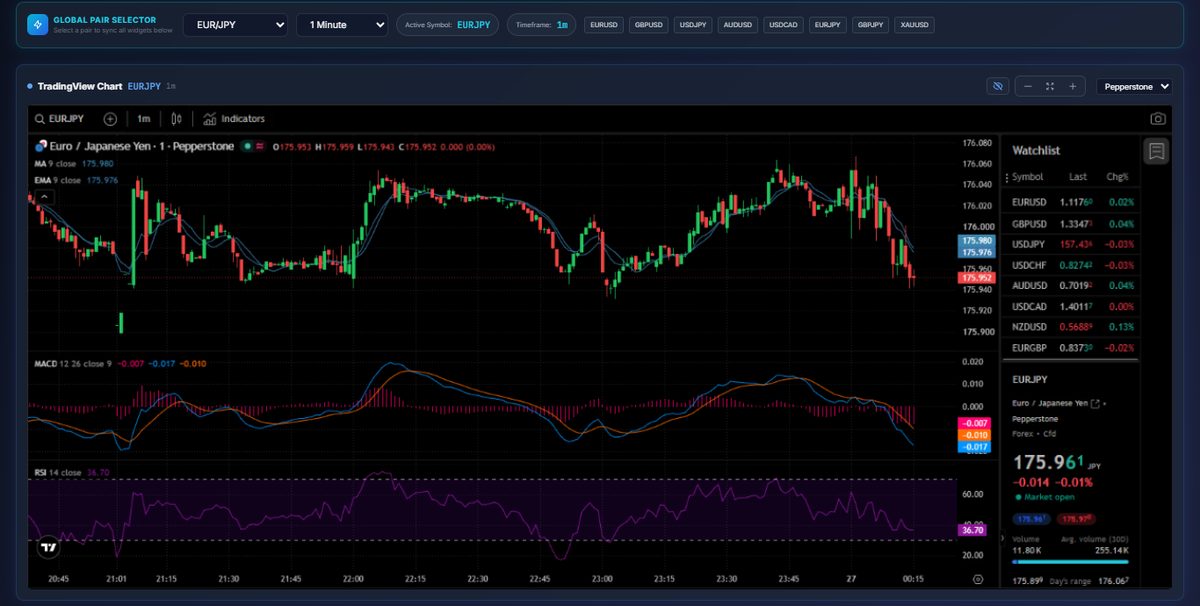
  • TradingView chart with a watchlist, MACD and RSI panels and the full TradingView toolbar
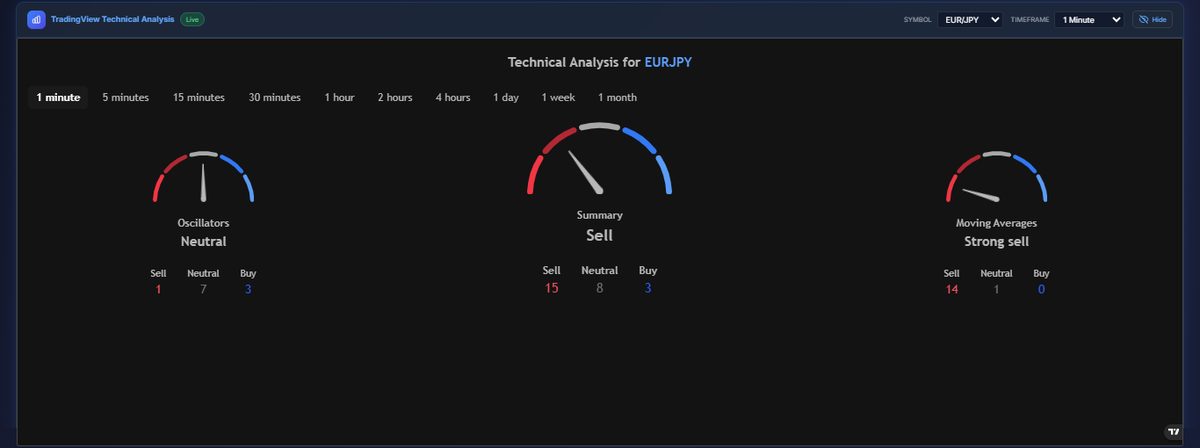
  • Technical analysis gauges for Oscillators, Moving Averages and an overall Summary, from 1 minute to 1 month
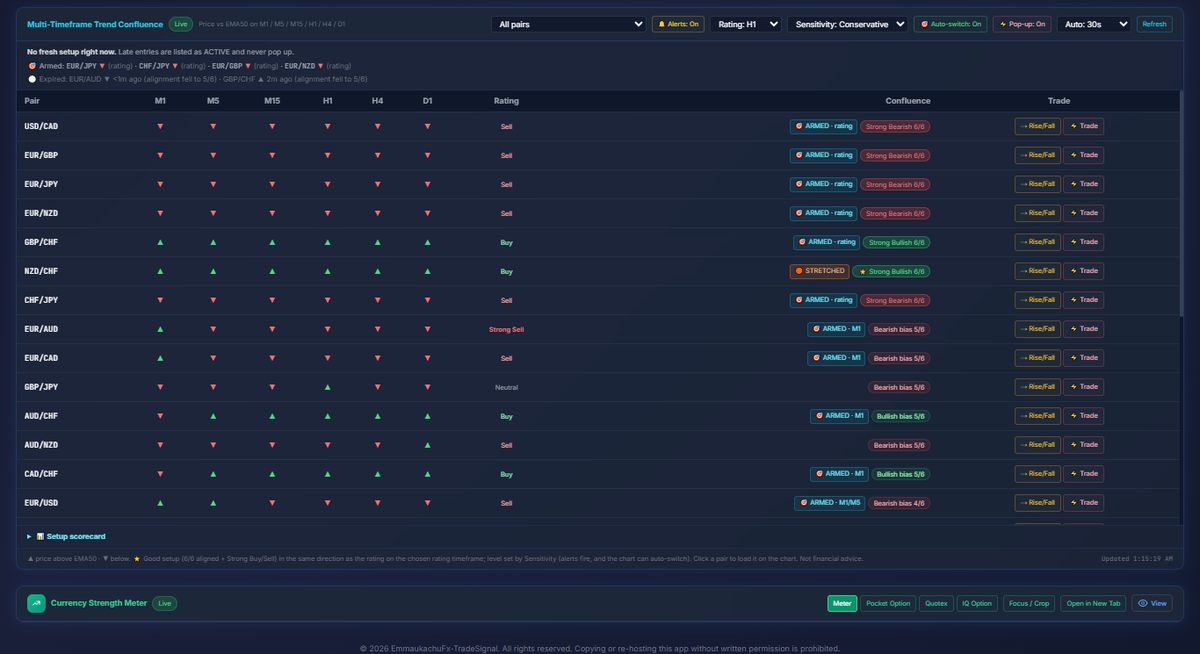
  • Multi-timeframe trend table for M1, M5, M15, H1, H4 and D1, with a rating for each pair
  • Setups marked ARMED or STRETCHED, with alerts, pop-ups and auto-switch if you want them
  • Currency strength meter, plus quick-pick buttons for EURUSD, GBPUSD, USDJPY, XAUUSD and more
  • TradingView
  • Forex
  • Gold
Web Intelligence tab: Live chart for the pair you pick
Live chart for the pair you pickCandles, moving averages, MACD, RSI and a watchlist. Switch pair and timeframe from one selector at the top.

Tab 2 of 8

Rise/Fall

A trade ticket for Deriv contracts, with a pro-grade chart around it and your own rules.

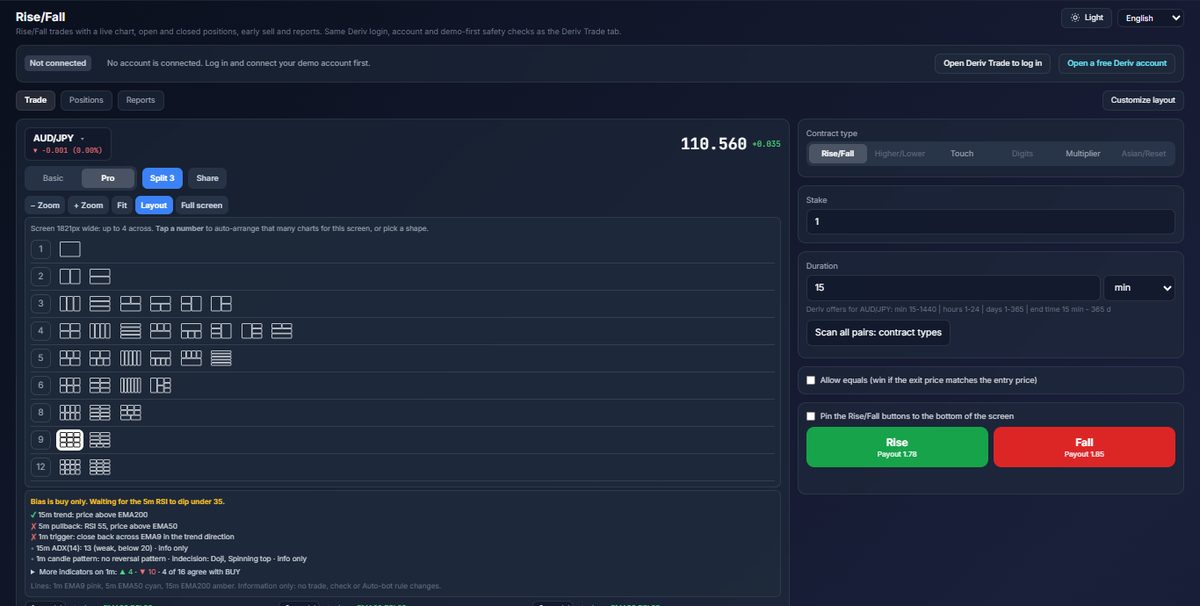
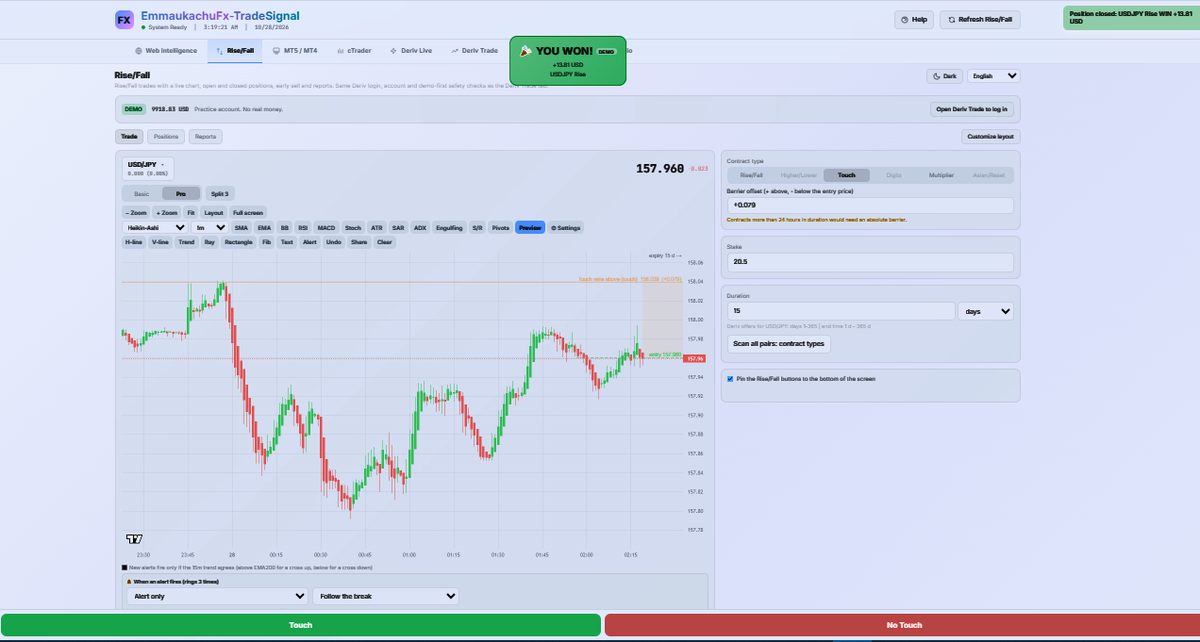
  • Basic and Pro layouts, with Rise/Fall, Higher/Lower, Touch, Digits, Multiplier and Asian/Reset contracts
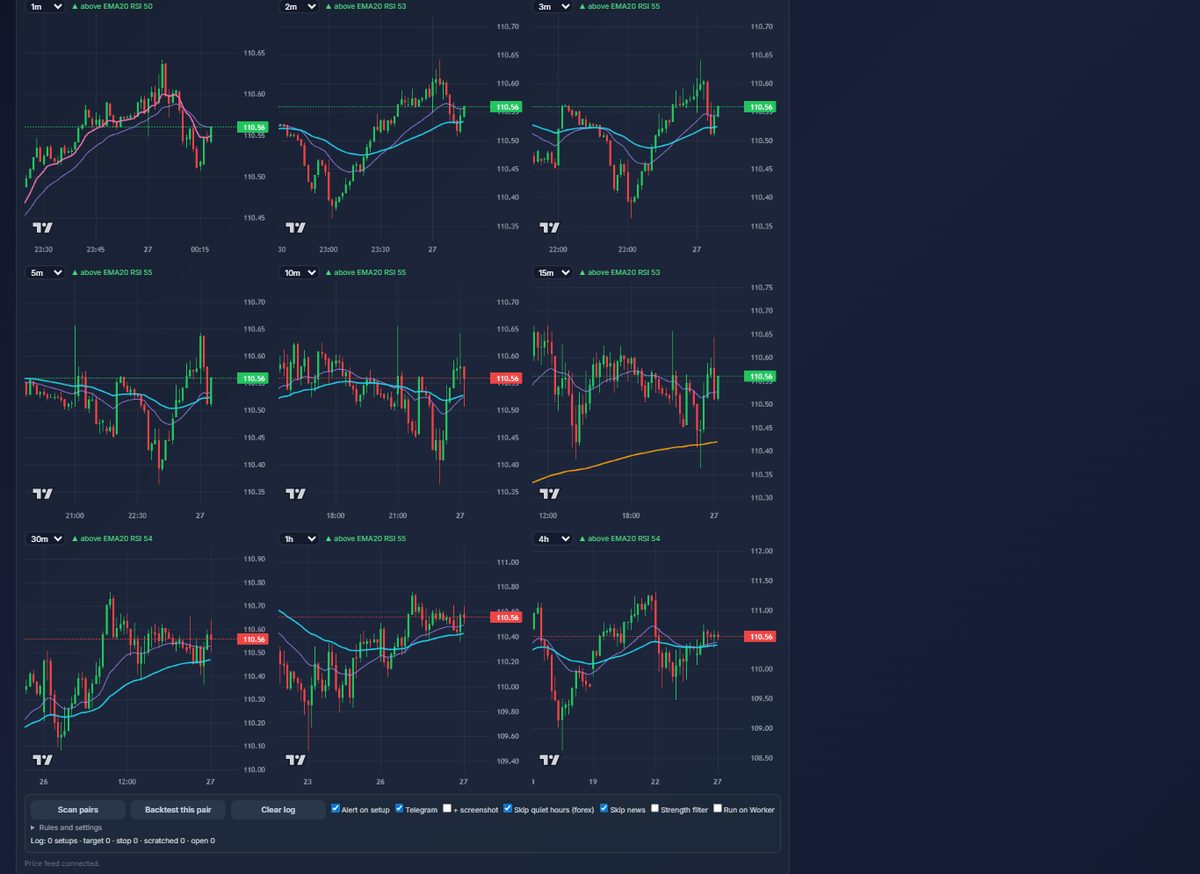
  • Show 1 to 12 charts at once in ready-made layouts, each on its own timeframe with a trend note
  • Pro toolbar: SMA, EMA, Bollinger, RSI, MACD, Stochastic, ATR, SAR, ADX, pivots, S/R and more
  • Drawing tools: horizontal and vertical lines, trend line, ray, rectangle, Fibonacci, text and alerts
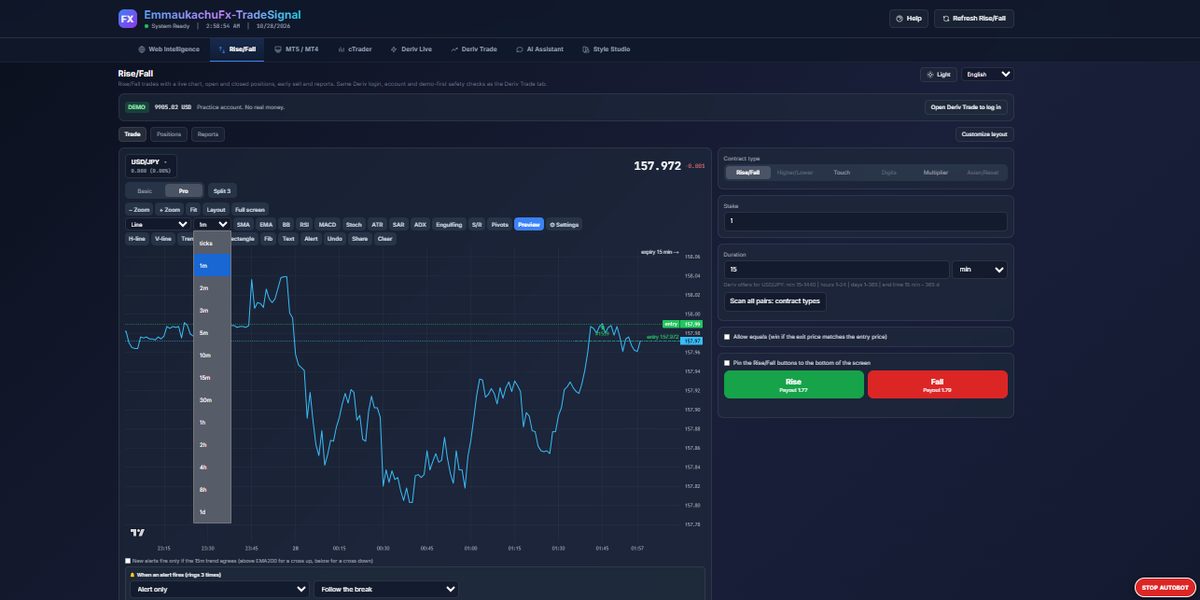
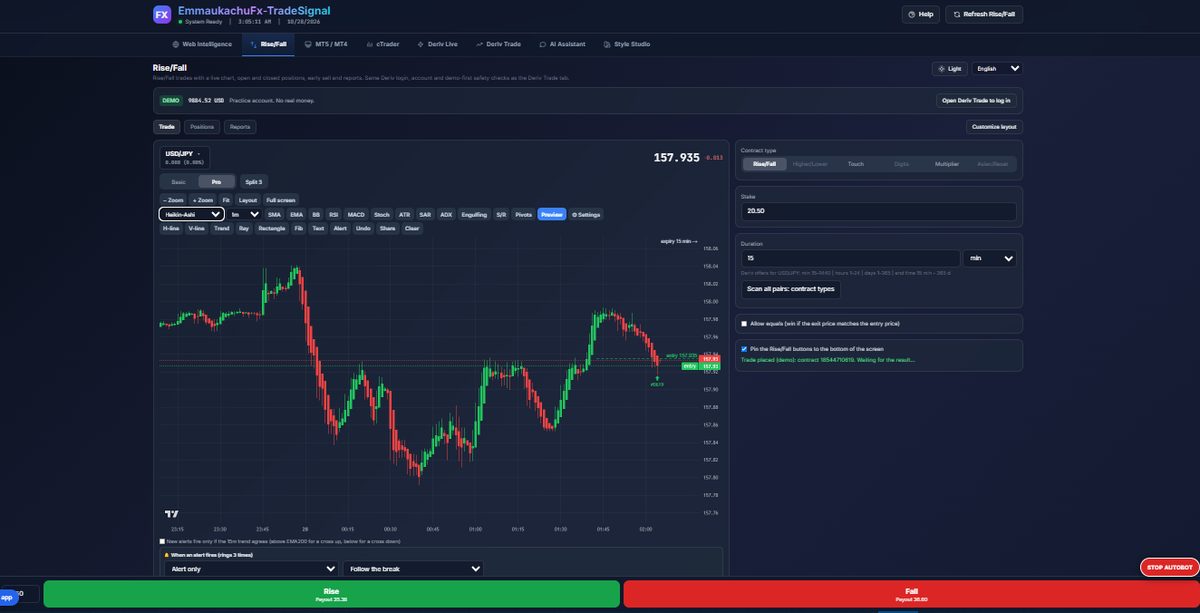
  • Chart types: Line, Area, Candles, Hollow candles, Heikin-Ashi and OHLC bars, from ticks up to 1 day
  • Open positions with early sell, closed trades and reports, in light or dark theme
  • Deriv
  • Demo first
  • Heikin-Ashi
  • Light and dark
Rise/Fall tab: Pick a layout, from 1 to 12 charts
Pick a layout, from 1 to 12 chartsTap a number to auto-arrange that many charts for your screen, or pick a shape. A short bias panel explains what the setup is waiting for.

Tab 3 of 8

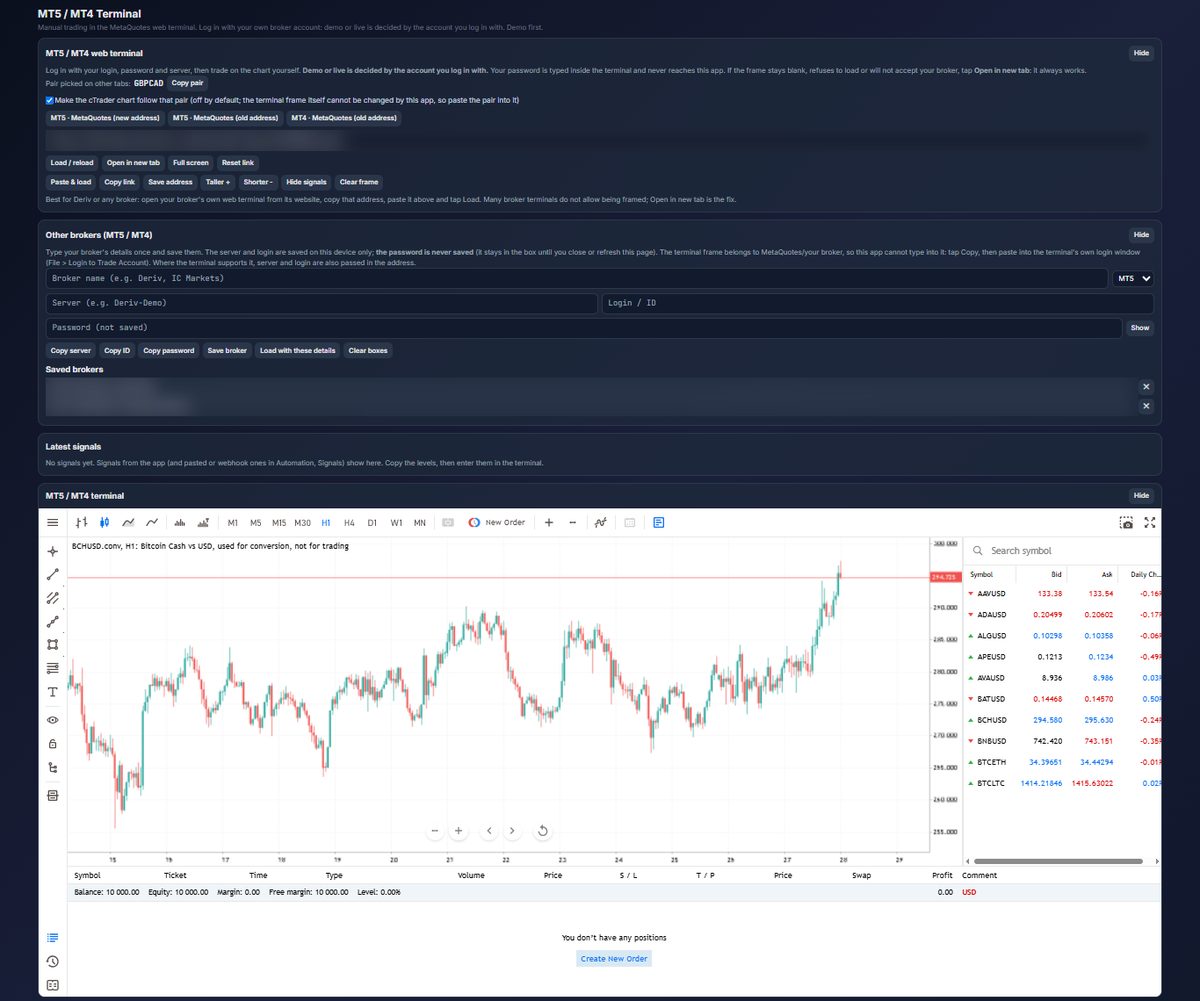
MT5 / MT4

A MetaTrader web terminal inside the app, so you do not switch windows.

  • Open the MetaQuotes MT5 or MT4 web terminal, or paste your own broker’s web terminal address
  • Save broker names and servers for next time; your password is never saved
  • Open full screen or in a new tab when you want more room
  • You log in on the terminal itself, with your own broker
  • MT5
  • MT4
  • Your broker’s terminal
MT5 / MT4 tab: The terminal, in the app
The terminal, in the appCharts, symbols list, order window and account panel come from the MetaTrader web terminal. Demo or live depends on the account you log in with. Account details are blurred in this screenshot.

Tab 4 of 8

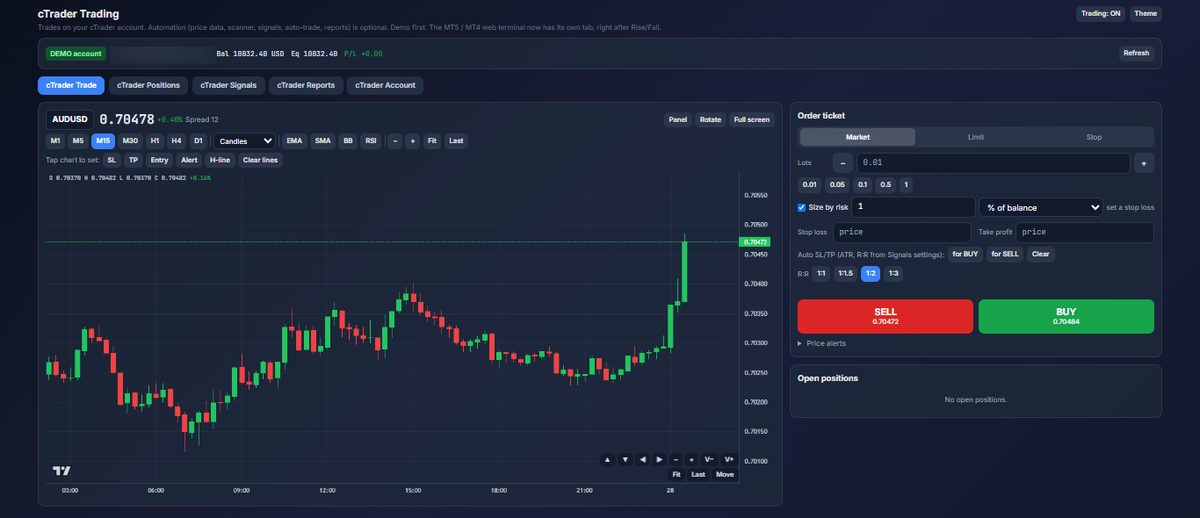
cTrader

Connect a cTrader account and work from five sub-tabs: Trade, Positions, Signals, Reports and Account.

  • Chart with M1 to D1 timeframes, indicators (EMA, SMA, Bollinger, RSI) and tap-to-set SL, TP, entry and alert lines
  • Order ticket: Market, Limit and Stop orders, lot size or size by risk %, stop loss, take profit and quick risk-reward presets
  • Price alerts, plus open and pending orders
  • Paste a signal to turn it into a trade, after setting your safety limits
  • Closed-trade reports you can export
  • cTrader
  • Orders
  • Alerts
  • Reports
cTrader tab: Chart and order ticket
Chart and order ticketSize a trade by a percentage of balance, then set stop loss and take profit with 1:1 to 1:3 risk-reward presets. A DEMO badge shows which account you are on. Account number blurred.

Tab 5 of 8

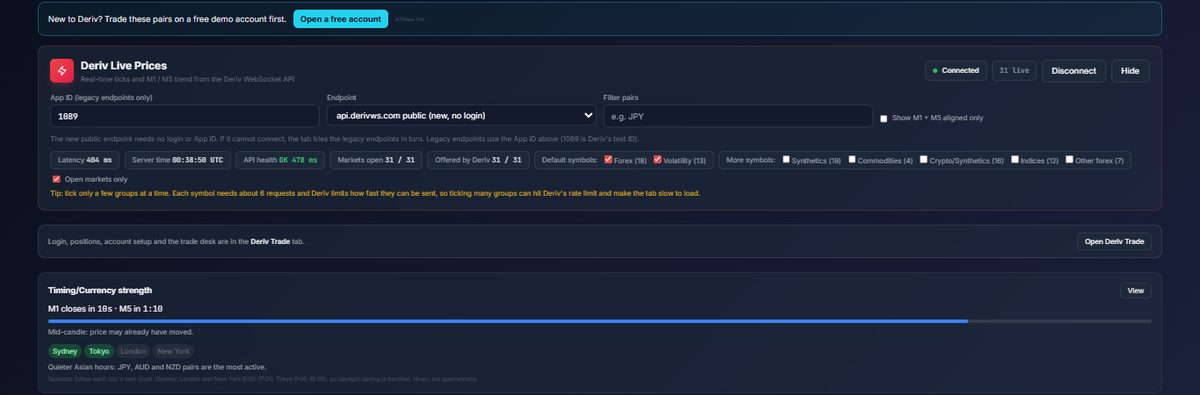
Deriv Live

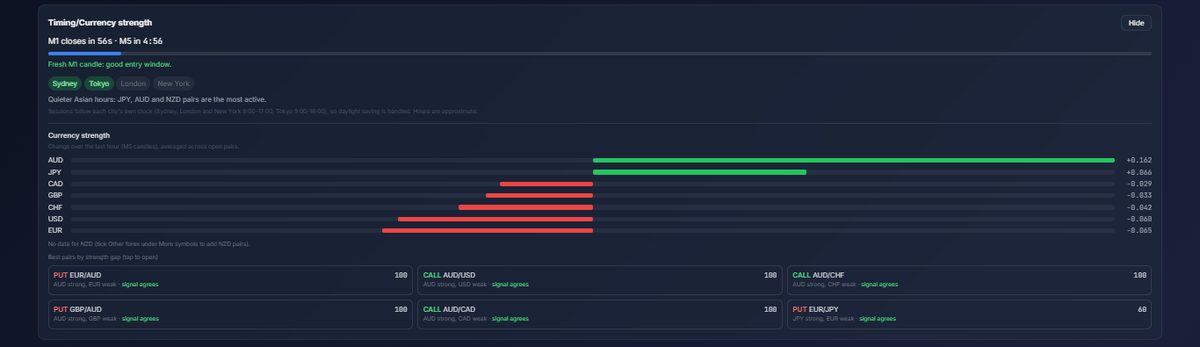
Live Deriv prices, with timing, currency strength and a ranked pair table next to them.

  • Connects to Deriv’s public price feed with no login, and shows latency and feed health
  • Choose which groups to watch: Forex, Volatility, Synthetics, Commodities, Crypto, Indices
  • Candle countdown and trading sessions (Sydney, Tokyo, London, New York)
  • Currency strength bars and a best-pairs shortlist
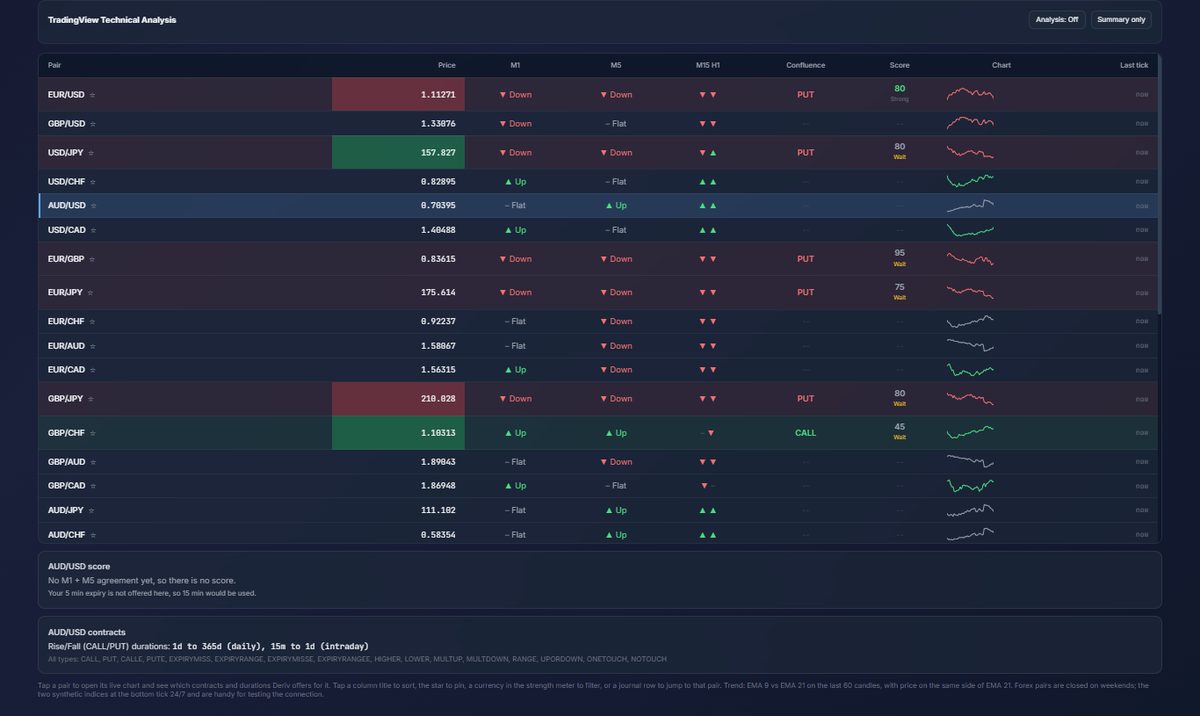
  • Pair table with trend per timeframe, CALL or PUT, a score out of 100 and a mini chart
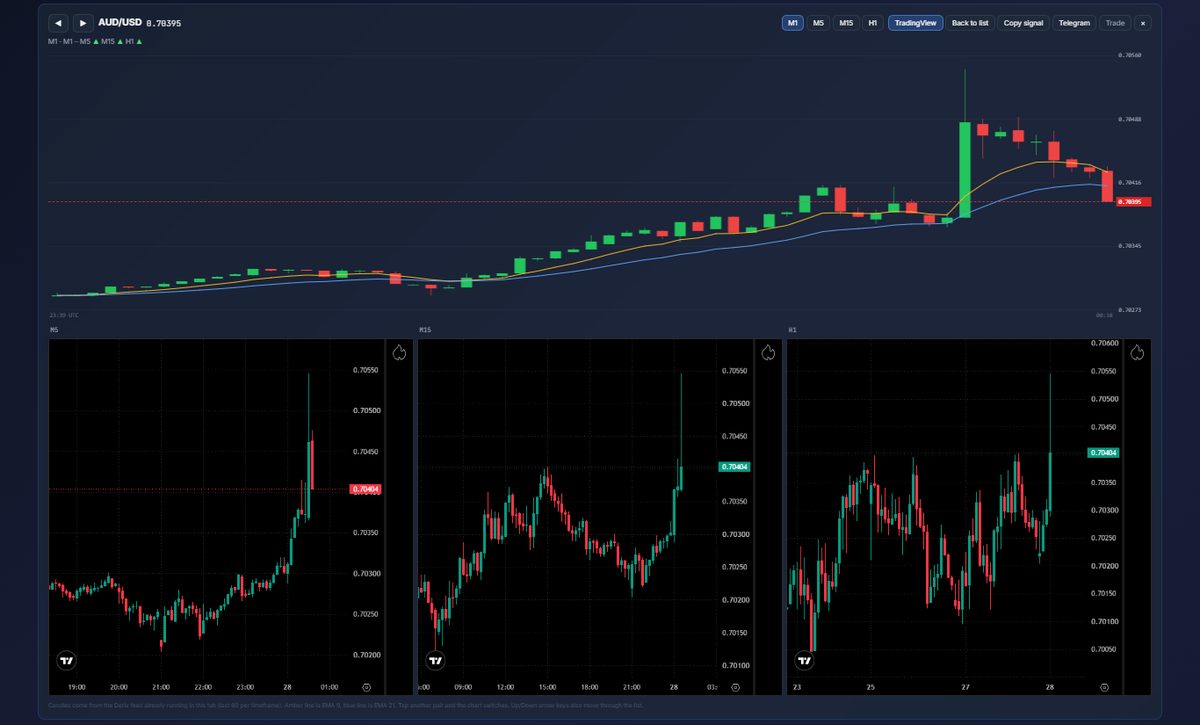
  • Tap a pair for a live chart with M5, M15 and H1 charts beside it, and TradingView on demand
  • Deriv
  • TradingView
  • Alerts
Deriv Live tab: Feed, filters and timing
Feed, filters and timingPick groups of symbols, see latency and feed health, and watch the M1 and M5 candle timers.

Tab 6 of 8

Deriv Trade

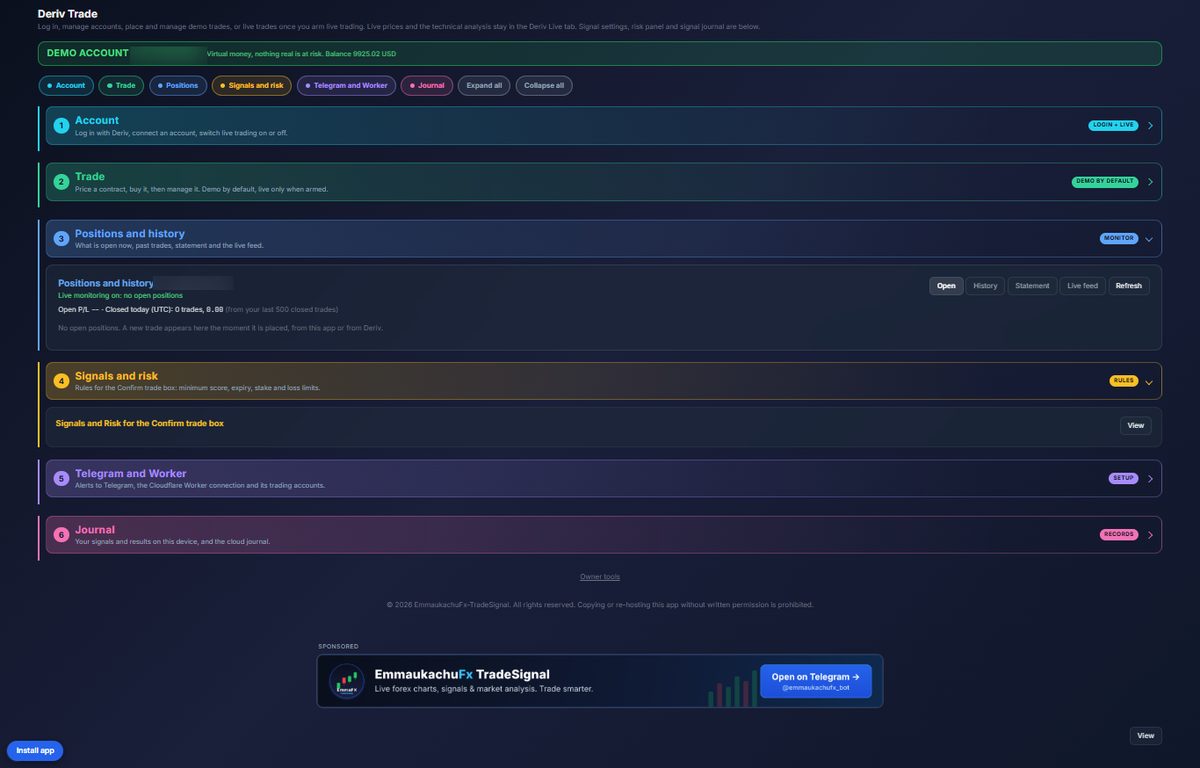
Log in with Deriv, price a contract and manage it. It starts on a demo account; live trading only runs when you switch it on.

  • Six collapsible sections: Account, Trade, Positions, Signals and risk, Telegram, and Journal
  • A banner always tells you whether you are on a demo or live account
  • Positions and history: open trades, history, statement and live feed
  • Signal and risk rules for the Confirm trade box: minimum score, expiry, stake and loss limits
  • Telegram alerts and a journal of your signals and results
  • Deriv
  • Telegram
  • Journal
Deriv Trade tab: Account, trade, positions, rules and journal
Account, trade, positions, rules and journalEach section opens and closes with one tap. Demo account number blurred in this screenshot.

Tab 7 of 8

AI Assistant

Ask about any pair in plain words, read the market and, if you choose, let the app act within limits you set.

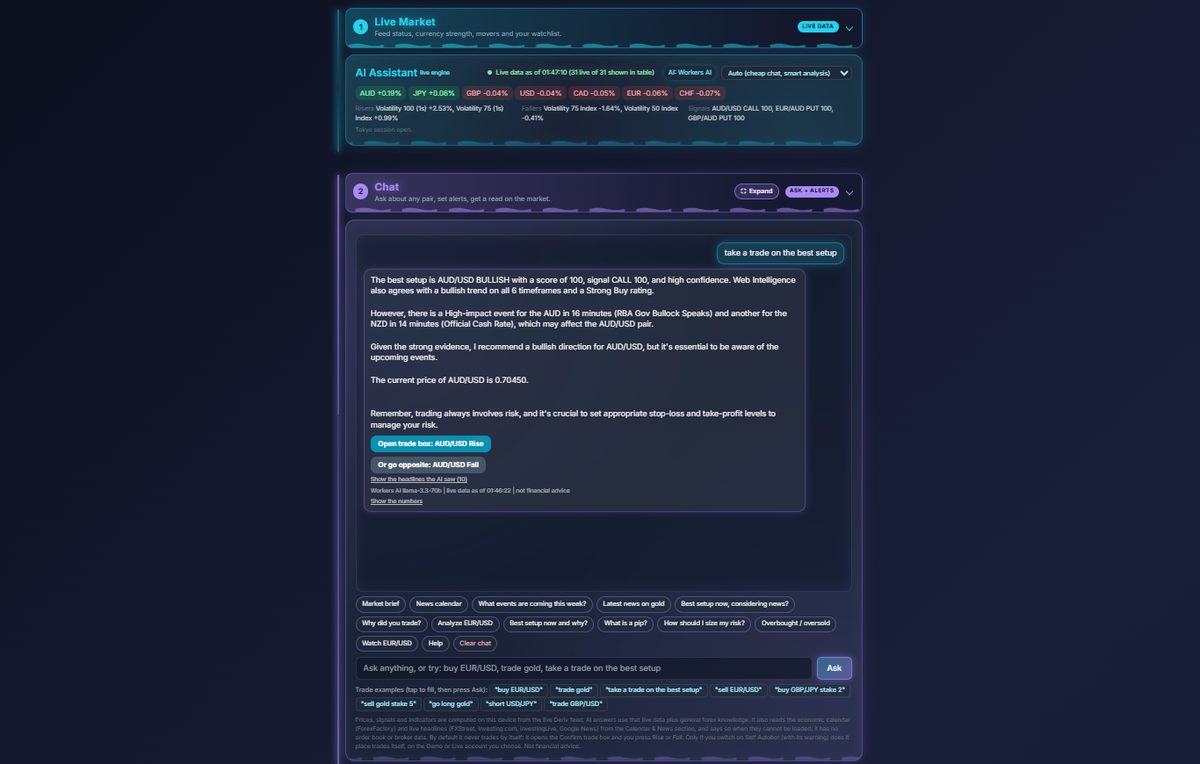
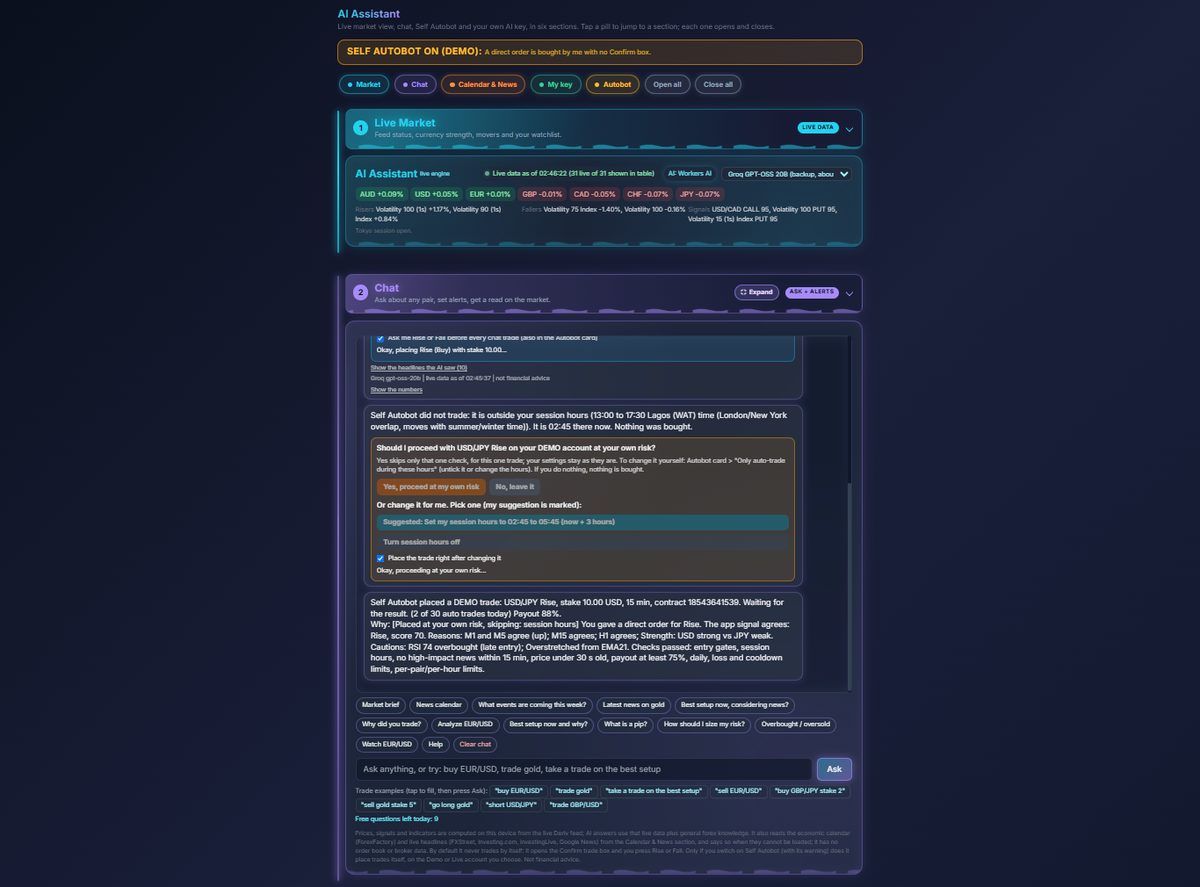
  • Live Market view with currency strength, risers, fallers and current signals
  • Chat: ask about a pair, set alerts, or type an order such as “buy EUR/USD” or “take a trade on the best setup”
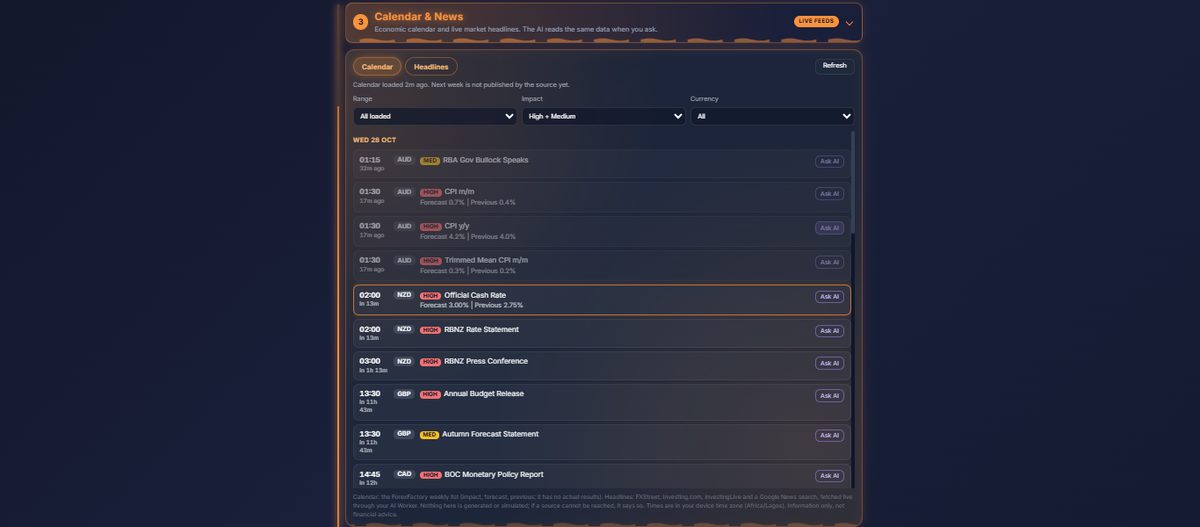
  • Economic calendar you can filter by range, impact and currency, with an Ask AI button on each event
  • Add your own AI key to remove the daily question limit
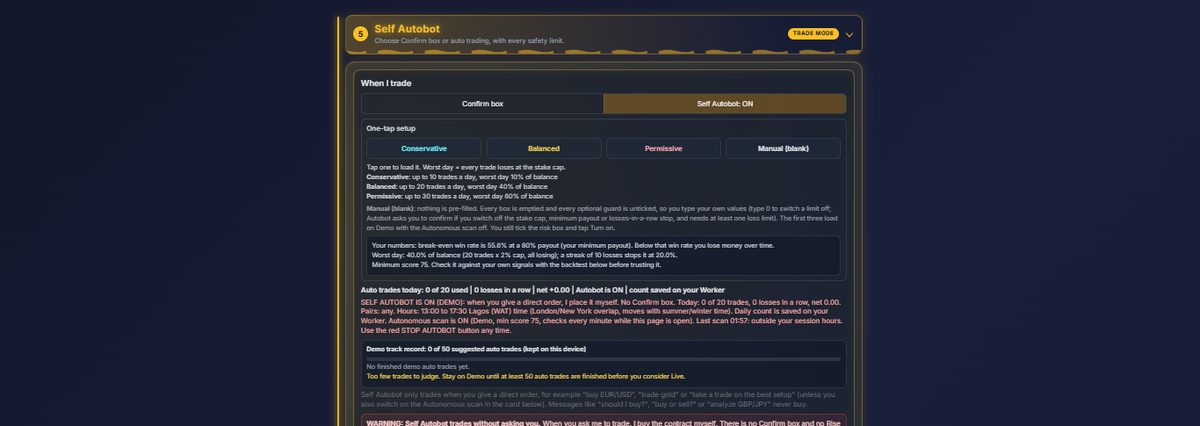
  • Self Autobot: Conservative, Balanced, Permissive or Manual presets, session hours, news blackout and loss limits
  • Confirm box mode by default, a visible STOP AUTOBOT button, and a demo track record before you consider live
  • AI chat
  • Calendar
  • News
  • Autobot
AI Assistant tab: Live market and chat
Live market and chatAsk for the best setup and get a reasoned answer, with a button to open the trade box on either side.

Tab 8 of 8

Style Studio

Make the app look and feel the way you like.

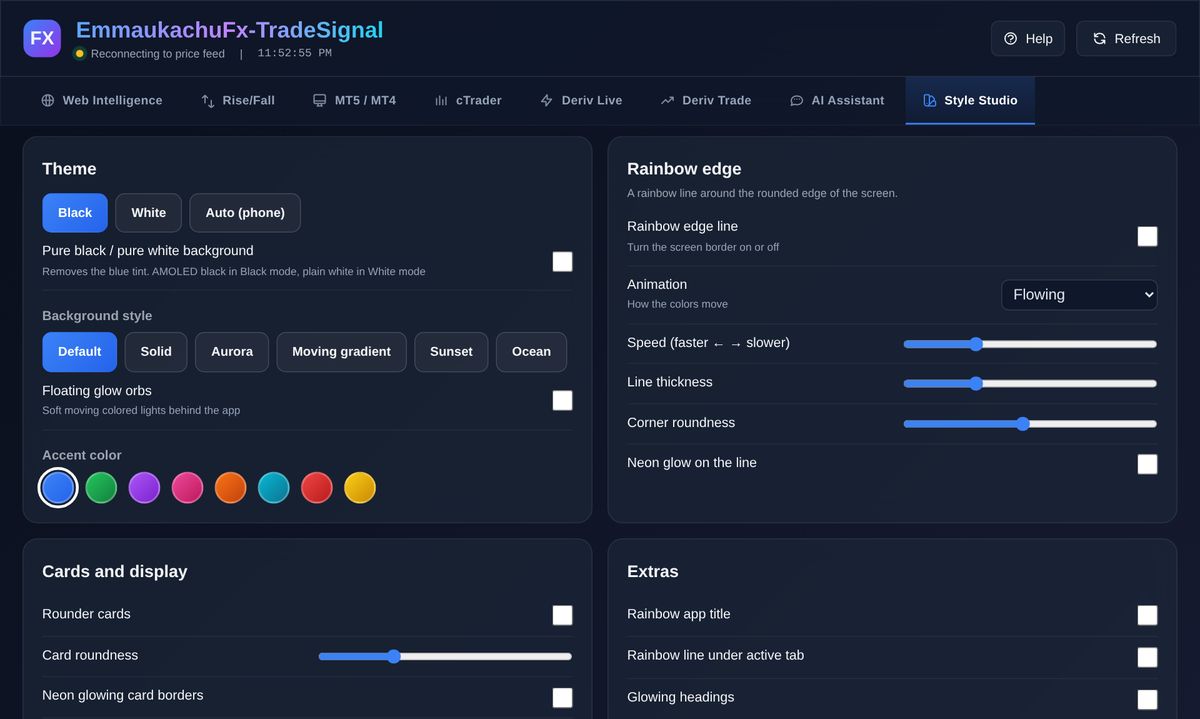
  • Black, White or Auto theme, with an optional pure-black background
  • Accent colours and background styles (Aurora, Moving gradient, Sunset, Ocean and more)
  • Your own buy and sell colours, text size, layout and saved looks
  • Auto-lock with a PIN and a lock button
  • Themes
  • Layout
  • Auto-lock
Style Studio tab: Theme, colours and layout
Theme, colours and layoutChange the theme, accent colour, background style, rainbow edge and card styling, then save the look.

Works with the platforms you already use

EmmaukachuFx TradeSignal is not a broker and does not replace your platform. It sits beside it, so you can read the market and place trades where you already have an account.

MT4 / MT5

Open the MetaQuotes web terminal, or your own broker’s web terminal address, in the MT5 / MT4 tab.

cTrader

Connect your cTrader account to chart, place orders, set alerts and read your reports.

TradingView

TradingView charts and technical analysis for the pair you pick, shown in Web Intelligence and Deriv Live.

Deriv

Live prices and Rise/Fall and other contracts on your own Deriv account, demo first.

Want to use it?

The app is private for now. If enough traders ask, we may open it to everyone. Tell us which tab or platform you care about most and it helps us decide.

Request access on Telegram

How it works

  1. Ask for access

    Message the bot on Telegram. The app is private, so access is given on request.

  2. Log in with Deriv

    You log in on Deriv’s official login page. The app never asks for your password.

  3. Use it as a tool

    Read the signals, check the charts and decide for yourself. Start on a demo account.

How we make money

So nothing is hidden, this is where the app’s income comes from.

Sources of income
SourceHow it works
Deriv referral linkIf you open a Deriv account through the app’s link, Deriv may pay the app owner a commission.
App fee (markup)Trades placed through the app can carry a small fee set by the app owner. It is included in the price Deriv quotes before you buy, and the app shows you the percentage before you trade.
Sponsored bannersSome banners are paid placements and are marked Sponsored. A sponsor is not a recommendation from us.

Your money and your data

  • The app is not a broker and never holds your money. Trades are placed on your own Deriv account under Deriv’s terms.
  • Your settings and Deriv login stay in your own browser. The login passes through a small token service that does not store it.
  • Questions you send to the AI are processed by an outside AI provider, so do not type personal or sensitive information.
  • You must be at least 18 and of legal age where you live. Deriv is not available in every country, so check your local rules before you trade.

Privacy Policy Terms of Use

Questions

Is this financial advice?

No. Signals, scores and AI answers are tools. They are never guaranteed, and past results do not predict future ones.

Why is the app private?

The app is private for now. Ask for access on Telegram and you will be told how to get in. If enough people ask, we may open it to everyone, so tell us you are interested.

Which broker does it use?

Deriv. Prices and trading come from Deriv, and you need your own Deriv account.

Can it trade for me?

Only if you switch on Self Autobot, which shows a warning first. By default the app never places a trade without your confirmation.

Who made it?

Ukachu Emmanuel Chinonso created the app. You can reach the owner by email or on Telegram.

Contact

Created by Ukachu Emmanuel Chinonso.